Junk Hauling Invoicing: How to Bill Jobs and Get Paid Fast
Junk hauling invoicing made simple: what to put on every invoice, how to bill dump fees and surcharges, take deposits, and get paid before you leave.
The Yardova team · October 30, 2026 · 16 min read
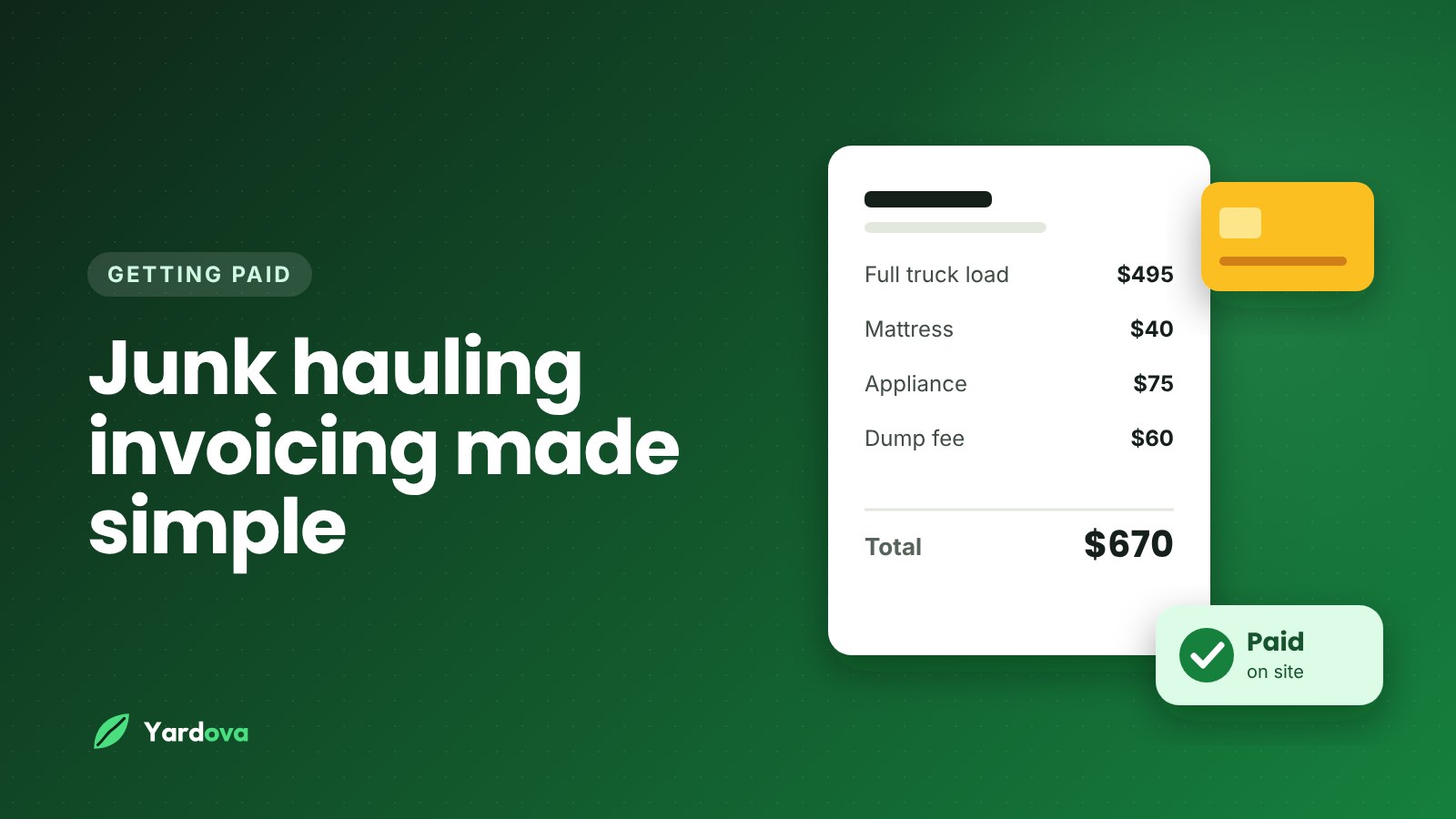
Good junk hauling invoicing is the difference between a full truck that turns into money in your bank account this week and a full truck that turns into a stack of "I'll send it Friday" promises. The hauling is the hard part physically. The billing is where a lot of junk removal businesses quietly lose money: forgotten surcharges, dump fees eaten by the owner, and invoices sent days late.
This guide covers the whole billing side of a junk removal business: what belongs on every invoice, how to show surcharges and dump fees so customers don't argue, when to take deposits, how to get paid on the spot, how to handle property managers on net terms, and how to keep clean records. Any dollar amounts below are simple examples to show the structure, not market prices.
Why junk hauling invoicing deserves its own system
Junk removal is not billed like mowing or cleaning. A lawn customer gets roughly the same invoice every week. A junk customer might be a single couch pickup, a garage cleanout, an estate job or a property manager with three move-outs a month.
That variety creates billing problems other trades don't have:
- The final price often isn't known until the truck is loaded
- Some items cost you extra to dump or recycle, like mattresses, tires and appliances
- Dump fees change by facility, by weight and sometimes by material
- Big jobs can take more than one load or more than one day
- Commercial customers expect a different process than homeowners
If you handle all of that from memory and a notepad, mistakes are guaranteed. A simple, repeatable system fixes most of them and makes you look more professional to people who are trusting you inside their home.
What a good junk removal invoice includes
The goal of junk hauling invoicing is an invoice the customer can read in ten seconds and see exactly what they paid for. Clear invoices get paid faster and disputed less.
The basics every invoice needs
- Your business name, phone number, email and website
- Invoice number (sequential, never reused)
- Invoice date and service date
- Customer name, service address and billing address if different
- Contact name, PO number or unit number for commercial accounts
- Payment terms, such as "due on receipt" or "net 15"
- Accepted payment methods
- A short thank-you line and a way to reach you with questions
Volume or load size
Most junk removal businesses price by how much of the truck the job fills, so show that clearly. Instead of "Junk removal - $450," write "Junk removal, 1/2 truckload (about 7 cubic yards)." The customer saw the truck. They can picture half of it.
If you price by item for small jobs, list each item. If you price by the hour for labor-heavy jobs, list hours and rate. Whatever model you use, the invoice should match how you quoted it. If you still need to build that pricing model, our guide on how to price junk removal walks through the math.
Item surcharges
Some items cost you more to get rid of. Common examples:
- Mattresses and box springs
- Tires, with or without rims
- Refrigerators, freezers and AC units that contain refrigerant
- TVs, monitors and other electronics
- Very heavy items like pianos, hot tubs or safes
Put each surcharge on its own line with the quantity. "Mattress disposal fee x 2" is far easier to accept than a mysterious higher total. And make sure your quote mentioned these fees first. A surcharge that appears for the first time on the invoice feels like a trick, even when it's fair.
Dump fees on the invoice
Junk hauling invoicing has two common options here. Build dump fees into your volume pricing, or pass them through as a separate line. Both work. What matters is deciding once and sticking with it.
If you pass them through, say so in the quote: "Disposal fees billed at cost based on the scale ticket." Then put the actual amount on the invoice and keep the ticket. If you add a handling markup to pass-through fees, label it honestly.
Labor, stairs and access
Extra effort should show up as its own line, not a vague bump in the total:
- Stairs, basements or long carries to the truck
- Disassembly of sheds, swing sets or bed frames
- Extra crew members for heavy items
- Wait time if the customer wasn't ready
Disposal, recycling and tax notes
A short note such as "Usable furniture donated, metal recycled, remainder disposed at licensed facility" builds trust and helps commercial customers who need records. Only write what you actually did.
Sales tax rules for junk removal vary by state and sometimes by city. Some places tax the service, some don't, and some treat disposal fees differently from labor. Ask your accountant or your state tax agency, then show any tax as its own line.
Junk removal invoice template: sample line-item layout
Here is a sample layout for a garage cleanout. The numbers are made up to show the structure.
- Invoice #1047 - Service date: Oct 14 - Due on receipt
- Customer: Dana R., 412 Oak Street
- Junk removal, 3/4 truckload (about 11 cubic yards): $525.00
- Mattress disposal fee x 1: $40.00
- Tire disposal fee x 4: $40.00
- Refrigerator with refrigerant, disposal fee x 1: $50.00
- Disassembly of workbench and shelving: $45.00
- Subtotal: $700.00
- Sales tax (only if it applies in your area): its own line here
- Deposit paid at booking: -$100.00
- Balance due: $600.00
- Notes: Metal recycled. Bike and patio set donated. Remaining items disposed at licensed facility.
- Pay by card, Apple Pay or Google Pay using the link in this invoice.
Every number has a reason next to it. If someone in the household asks "why $700?" later, the answer is already on the page.
Junk hauling invoicing on site vs. sending it later
The best time to invoice a residential junk job is before the truck leaves the driveway. The customer just watched you clear out their garage. They're relieved, they're standing right there, and the value of your work has never been more obvious.
Invoicing on the spot means:
- The customer can see the empty space and the full truck
- Questions get answered in person, not by text three days later
- No invoicing session for you that night at the kitchen table
- Payment often happens in the next two minutes
Every day an invoice waits, the job feels a little less valuable and a little more like a bill. That's human nature, not bad customers.
When invoicing later makes sense
- Pass-through dump fees you won't know until you hit the scale
- Multi-day cleanouts billed once at the end
- Commercial accounts that require invoices sent to an accounts payable email
- Estate jobs where the person paying isn't on site
For unknown dump fees, one approach is to collect labor and hauling on site, then send a short second invoice for disposal with a photo of the scale ticket. Another is to estimate disposal, collect it on site, and settle the small difference later. Pick whichever your customers find less confusing.
If slow payment is a problem across your whole business, our guide on how to get paid faster as a service business covers more ways to close the gap.
How to invoice a junk removal job, step by step
Here is a repeatable junk hauling invoicing process for a typical residential job. Train every crew lead to follow it the same way.
- Confirm the quote before loading. Walk the job with the customer and confirm the estimated load size and surcharge items. If anything changed, say so now.
- Take before photos. A few quick shots of the pile protect you if a customer later questions the volume.
- Load and note extras. Write down surcharge items, stairs and disassembly as you go.
- Check the final load size. Look at the truck honestly. If the job came in smaller than quoted, charge the smaller amount. Nothing builds trust faster.
- Take after photos. Show the empty space and the loaded truck.
- Build the invoice on your phone. Use saved line items so you're tapping, not typing.
- Walk the customer through it. Point out each line and answer questions right there.
- Collect payment. Card, Apple Pay or Google Pay on the spot, or text a payment link while you're standing there.
- Send the receipt. Make sure the customer gets it by text or email.
- Log disposal details. Attach the scale ticket or dump receipt to the job the same day.
Once your crew is used to it, the billing part takes about five minutes.
Junk removal deposits for big cleanouts
For small pickups, a deposit usually isn't worth the friction. For large jobs, it's smart protection.
When to ask for a deposit
- Whole-house, estate or hoarding cleanouts
- Jobs that need multiple loads or multiple days
- Jobs that require extra crew or rented equipment
- Customers booking far in advance
- Any job where a no-show would cost you a full day
How much to ask for
A flat amount, such as enough to cover your first load's disposal, is common for mid-size jobs. For very large jobs, a deposit of around 25 to 50 percent of the estimate is common practice. Put the amount and your cancellation policy in writing in the quote.
Always show the deposit as a credit on the final invoice, like the "-$100.00" line in the sample above. Customers who don't see their deposit applied think they're being charged twice, and they'll call you about it.
Junk removal payment options: card, Apple Pay, Google Pay and text links
The easier it is to pay, the faster you get paid. Junk removal customers are often moving, selling a house or handling a family estate. They're busy and distracted, so remove every bit of friction.
Take cards on the spot
Cards are the default for most homeowners, and taking one at the truck closes out the job before you leave. Apple Pay and Google Pay are even faster: the customer taps their phone and confirms.
Card processing costs a fee, usually a few percent. Most owners build it into their pricing rather than fight customers over it. Rules on adding card surcharges vary by state and card network, so check before you add one.
Payment links by text
In junk hauling invoicing, a payment link sent by text is often the smoothest way to collect. The customer taps it, sees the invoice, and pays with whatever is saved on their phone. It works especially well when:
- The person paying isn't on site, like an adult child paying for a parent's cleanout
- The customer wants to review the invoice before paying later that day
- You finished while the customer was at work
Cash, checks and payment apps
If you take cash, always give a receipt and record it the same day. Mark checks as paid only after they clear. If you accept Venmo, Zelle or Cash App, list them on the invoice so customers don't have to ask, and send those payments to a business account, not your personal one.
Net 30 terms for property managers and commercial accounts
Property managers, realtors, landlords and contractors send repeat work, rarely haggle, and refer you to others. They also expect to be billed differently from homeowners.
Set up the account before the first job
Collect:
- Company legal name and billing address
- Accounts payable email and contact name
- Whether they need a PO or work order number on every invoice
- Whether they need a W-9 from you
- The payment terms you've agreed to
- Who is allowed to approve jobs
This avoids the classic problem: you do the work, send the invoice, and it sits in an inbox because it was missing the unit number accounts payable needed.
Choosing your terms
Net 30 means the invoice is due 30 days after the invoice date. Net 15 is shorter. Larger companies may insist on net 30, but smaller property managers will often accept net 15 if you ask.
Tips for commercial junk hauling invoicing:
- Send one invoice per job or per unit unless they ask for a monthly summary
- Include the property address and unit number on every invoice
- Attach before and after photos, which managers use for move-out records
- Follow up the day after an invoice goes past due, not three weeks later
For smaller landlords, ask whether they'd like a card kept on file and charged after each job. Many prefer it because there's nothing to process. Always get clear permission before saving and charging a card.
Payment reminders that get junk removal invoices paid
A polite reminder at the right time collects most late invoices without awkwardness.
A simple reminder schedule
- Day of the job: invoice and receipt sent
- Due date: friendly reminder if unpaid
- 3 days past due: second reminder
- 7 to 10 days past due: phone call
- 30 days past due: firm written notice explaining next steps
Copy-paste payment reminder text
Hi Dana, this is Mike with Ridgeline Hauling. Thanks again for having us clear out the garage on Oct 14. Just a friendly reminder that invoice #1047 for $600 is still open. You can pay by card, Apple Pay or Google Pay here: [payment link]. If you have any questions about the invoice, just reply to this text and I'll help.
It names the job, the amount and the invoice number, and gives a one-tap way to pay. It assumes the customer simply forgot, which is almost always true.
Don't send reminders late at night, don't threaten in early reminders, and keep collections with the owner or office rather than the crew. Before texting customers at all, make sure you have permission and follow current business texting rules. Asking "Is it OK to text you about this job?" at booking covers most residential customers.
Record keeping for taxes and dump receipts
Clean junk hauling invoicing records make tax time easier and protect you in a dispute. For each job, keep:
- The quote and the final invoice
- Before and after photos
- Scale tickets and dump receipts tied to the job
- Recycling and donation receipts, if any
- Payment records, including method and date
Disposal is often one of your biggest costs after labor and fuel. If you pass dump fees through, the receipt backs up the charge. If you build them into pricing, the receipts tell you whether your prices still work. Snap a photo of every receipt at the facility and attach it to the job that day. Once a month, compare total disposal costs to what you charged. If the gap is shrinking, update your prices.
Ask your accountant how they want income and expenses organized and how long to keep records, since rules vary. A clean export of paid invoices beats handing over a shoebox.
Junk removal invoice checklist and common mistakes
Junk removal invoice checklist
Run through this before every invoice goes out:
- Customer name, address and contact info are correct
- Invoice number is new and in sequence
- Load size or item list matches what was actually hauled
- Every surcharge item is listed with a quantity
- Dump fees are included or listed as pass-through, matching the quote
- Stairs, carries, disassembly or extra labor are listed
- Deposit is shown as a credit
- Tax is its own line where it applies
- Payment terms and payment methods are clear
- PO or unit number is included for commercial customers
- Before and after photos and the dump receipt are saved to the job
Common junk hauling invoicing mistakes
- Forgetting surcharges. The crew hauls four tires and a fridge, but the invoice only shows load size.
- Vague line items. "Junk removal - $650" invites questions. Itemized invoices get paid.
- Surprise fees. A fee not mentioned at quoting damages trust and invites disputes.
- Invoicing days later. The longer you wait to bill, the longer you wait to get paid.
- No deposit on big jobs. One cancelled whole-house cleanout can wreck a week.
- Losing dump receipts. You can't back up a pass-through fee you can't prove.
- No follow-up system. Unpaid invoices don't fix themselves.
- Missing PO numbers. A commercial invoice without the right reference can sit unpaid for weeks.
Most of these come from invoicing from memory at the end of a long day. The checklist and saved line items solve most of them.
Junk hauling invoice software vs. paper and spreadsheets
Plenty of owners start their junk hauling invoicing with a carbon-copy invoice book or a spreadsheet. The question is when that starts costing more than it saves.
Paper is cheap and works without signal, but there's no easy card payment, no text payment link, lost copies and no clear record of who owes you. A spreadsheet helps with tracking, but you still create and send invoices somewhere else and must remember to update it. It works for a solo operator doing a few jobs a week and breaks down with two trucks.
What to look for in invoicing software
- Invoices you can build and send from your phone in the driveway
- Saved line items for load sizes and surcharges
- Card, Apple Pay and Google Pay, with money going to your own bank account
- Payment links sent by text and email
- Deposits collected when the customer approves the quote
- Automatic payment reminders
- Saved cards and autopay for repeat commercial customers
- Job photos attached to each job
- A simple view of who owes you money
For a broader look at the tools a junk business runs on, see our guide to junk removal business software.
Yardova's junk removal software covers this junk hauling invoicing workflow. Crews send invoices by text or email right after the job, and customers pay by card, Apple Pay or Google Pay through your own Stripe account, so the money goes to your bank. You can also show PayPal, Venmo, Cash App, Square or Zelle on invoices, collect a deposit when a quote is approved, keep saved cards for property managers, and let automatic reminders follow up on overdue invoices. Customers paying online can add a tip if they want to.
Frequently asked questions
What should be on a junk removal invoice?
A junk removal invoice should list your business info, the customer's info, an invoice number, the service date, the load size or items hauled, each surcharge, dump fees, extra labor, taxes where they apply, any deposit credit and the balance due. Add payment terms and accepted payment methods. A short, accurate note about donation or recycling is a nice touch.
Should I charge dump fees separately on a junk removal invoice?
You can either build dump fees into your volume price or list them as a separate pass-through line, and both are common. Building them in keeps invoices simpler for homeowners. Passing them through at cost protects you when disposal costs vary. Whichever you choose, explain it in the quote and keep the receipts.
How much deposit should I take for a junk removal job?
Many junk removal businesses skip deposits on small pickups and take one on large cleanouts. For big multi-load or multi-day jobs, a deposit of around 25 to 50 percent of the estimate is common practice. Put the amount and your cancellation policy in writing and show the deposit as a credit on the final invoice.
When should I send an invoice for junk removal?
Send residential invoices on site, before you leave, whenever you can. The customer sees the finished work and can pay right away. Commercial jobs and jobs with unknown dump fees may be invoiced later, but aim for the same day or the next morning.
How do I get property managers to pay junk removal invoices on time?
Set up the account before the first job, including the accounts payable contact, required PO or unit numbers and agreed terms. Send clean invoices with photos attached and follow up the day after an invoice goes past due. For smaller landlords, a card on file charged after each job often solves the problem.
Can I charge a credit card fee on junk removal invoices?
Possibly, but rules on card surcharges vary by state and by card network. Check current rules in your state and your payment processor's terms before adding one. Many owners simply build processing costs into their prices instead.
Wrap-up: junk hauling invoicing that gets you paid
Strong junk hauling invoicing comes down to a few habits:
- Itemize load size, surcharges, dump fees and extra labor
- Mention every fee in the quote so the invoice holds no surprises
- Invoice on site and collect payment before the truck leaves
- Take deposits on big cleanouts and show them as credits
- Make paying easy with cards, Apple Pay, Google Pay and text payment links
- Set up commercial accounts properly and follow up on time
- Keep photos and dump receipts with every job
Do this on every job and you'll spend less time chasing money and more time filling the truck. To tighten up the front end of your jobs, read how to write a quote for a service business. When you're ready to invoice from your phone, start a free Yardova account, compare plans and pricing, or book a demo and we'll walk through it with you.