Junk Removal Business Software: A Practical Buyer's Guide
A buyer's guide to junk removal business software: what it should do, a checklist, real costs, mistakes to avoid, and how to switch from paper.
The Yardova team · 30 de outubro de 2026 · 16 min de leitura
The right junk removal business software is the difference between a phone that rings into a black hole and a schedule full of booked, paid jobs. When you run one to ten trucks, most of your day is spent answering leads, pricing loads from photos, juggling crews and collecting money in a driveway.
This guide is for owners comparing options. It covers what the software needs to do for a hauling company, what to look for, the mistakes that waste money, a buyer's checklist, a step-by-step setup process for moving off paper and spreadsheets, and what it typically costs. Any numbers below are simple examples to show the math, not industry statistics.
What junk removal business software should actually do
A lot of field service software is built for trades with long, planned jobs. Junk removal is different. Jobs are short, often booked the same week or the same day, priced by volume, and paid on the spot. Your software should match that rhythm.
At a minimum, good junk hauling software should handle the full path of a job:
- Catch the lead from your website, Google, Thumbtack, Angi, Facebook, calls and texts.
- Reply fast so the customer doesn't book the next company they called.
- Price the load from photos or a description, using your volume tiers.
- Book the job onto the right truck and crew.
- Remind the customer and text them when the crew is on the way.
- Capture the job on site with before and after photos and the final load size.
- Invoice and collect before the truck leaves the driveway.
- Ask for a review while the customer is still happy about their empty garage.
- Report on where jobs came from and what you earned.
The goal is one place where a lead becomes a job, a job becomes an invoice, and an invoice becomes money in the bank.
Junk removal app versus full CRM
Some owners start with a simple junk removal app for invoicing and nothing else. That works when you have one truck and answer every call yourself. Once you add a second truck or a dispatcher, you need a junk removal CRM: a shared record of every customer, quote, job, photo and payment that the whole team can see. See our guide to a CRM for small service businesses.
Lead capture: where junk removal jobs come from
Junk removal leads are urgent. Someone is moving out Friday, a landlord needs a unit cleared, a family is emptying a parent's house. They usually contact two or three companies and book whoever answers first with a clear price, so lead capture is the first thing to test in any junk removal business software.
Sources your software should pull in
- Your website quote form
- Your Google Business Profile
- Lead marketplaces such as Thumbtack and Angi
- Facebook and Google ads
- Phone calls, including missed calls and voicemails
- Texts to your business number
- Referrals from realtors, property managers and past customers
The test is simple: does every lead land in one list automatically, or does someone have to copy it in by hand? Copying leads from three apps and a voicemail box is where jobs slip through. Look for junk removal business software that merges duplicates, because the same customer often fills out your form and calls you ten minutes later.
Speed of reply matters more than almost anything
When you are on a job with gloves on, you can't answer the phone. What costs you is the hour of silence after the missed call. An automatic text back on a missed call, or an instant reply to a new web lead, keeps the customer talking to you instead of dialing the next number. Our post on how missed calls cost service businesses jobs goes deeper on this.
A good instant reply is short and asks for what you need to price the job:
Hi, thanks for reaching out to Big Haul Junk Removal. We're on a job right now but want to get you a price fast. Can you text us a few photos of the items and let us know if they're in a garage, basement or upstairs? We'll reply with a quote shortly.
Asking for photos up front
Photos are the most useful thing a junk removal lead can send you. A quote request page that lets customers upload pictures with their request saves a site visit on most jobs. Ask for photos from a few angles, plus the location of the items (curbside, garage, upstairs, basement), because carrying a couch down two flights is a different job than tossing it from the driveway.
Fast quotes by volume: quarter, half and full truck
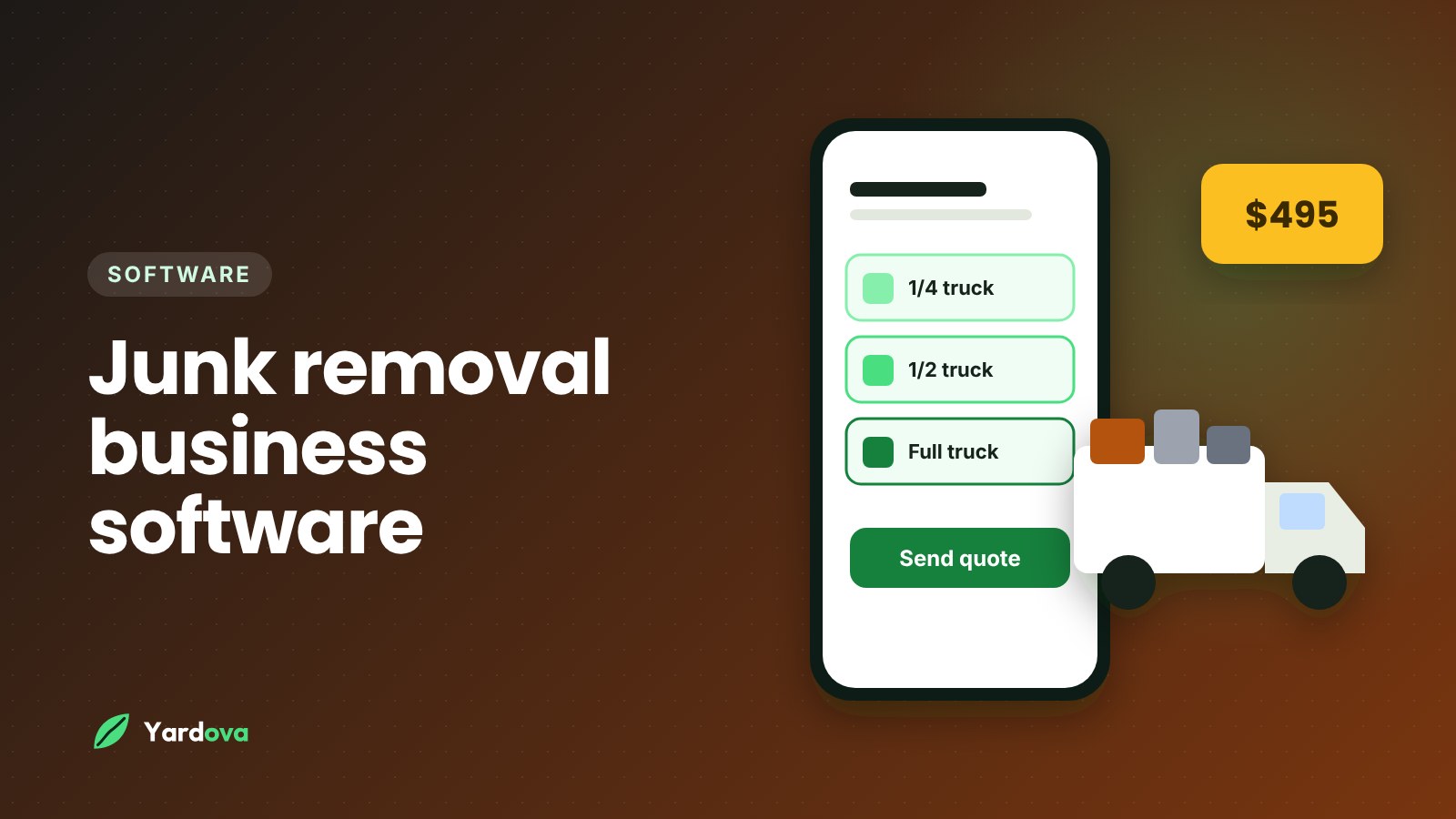
Most hauling companies price by how much of the truck a load fills. A typical setup looks like this:
- Single item or minimum load
- Quarter truck
- Half truck
- Three-quarter truck
- Full truck
- Surcharges for heavy material, stairs, long carries or special items
If you haven't nailed down your tiers yet, start with our guide on how to price junk removal. Your junk removal business software should then make those prices quick to use on every lead.
What good junk removal quote software looks like
- A saved price list with each volume tier and common surcharges, so any team member quotes the same way
- Quotes from photos or a description, so you can price most jobs without driving out
- Quotes sent by text, since that's how most junk customers want to talk
- Online approval in one tap, so you're not chasing a callback to confirm
- An optional deposit at approval for large cleanouts or jobs booked far out
- A clear range or "up to" price for jobs you can't size precisely from photos
Quoting ranges without losing trust
Photos never show everything. A common, fair approach is to quote a range or an "up to" price based on the photos, then confirm the final price on site before loading. For example, if the photos look like a quarter to a half truck, quote both tiers and explain that the crew will confirm before starting.
Your software should let the crew adjust line items on site so the invoice matches what actually went in the truck. Note items with special disposal rules, such as mattresses, tires, paint or appliances, which may carry extra fees depending on your area. For a full walkthrough on clear quotes, see how to write a quote for a service business.
Junk removal scheduling software for trucks and crews
Good scheduling is where junk removal business software earns its keep day to day. You have trucks with different capacities, crews of two or three, dump runs in the middle of the day, and customers who want a two-hour arrival window.
What the schedule should show
- Every truck or crew in its own color so you can see the day at a glance
- More than one person on a job, since most junk jobs need at least two
- Each crew's stops for the day in driving order, with one-tap directions
- Job notes such as gate codes, parking instructions and "items are in the back shed"
- Photos from the customer attached to the job so the crew knows what to expect
- A checklist for steps like sweeping the area and taking after photos
Plan around the dump run
A full truck has to empty before it can take the next load. When you schedule, think in terms of loads, not just stops. For example, if a crew has two half-truck jobs and a full-truck cleanout, plan a dump run between them instead of hoping the truck has room.
If you land property managers or retail stores that want regular pickups, repeating jobs (weekly, every other week or monthly) save you from rebuilding the same appointment by hand. For more on building a smart day for each crew, see our guide to crew scheduling for service businesses.
Reminders and "on my way" texts
A booking confirmation, a reminder the day before and an "on my way" text cut down on no-shows and "can you come back later" calls. Make sure your junk removal business software sends these automatically so the crew isn't typing texts at stoplights.
Tracking dump fees, labor and job costs
Disposal fees and labor change from load to load. If you don't track them, you can stay busy all month and still wonder where the money went.
Dump fees
Transfer stations and landfills usually charge by weight or by load, and some items carry their own fees. Keep a record of what each dump run costs and which jobs it covered. Even a simple habit helps: the crew snaps a photo of every dump ticket and attaches it to the job or drops it in a shared folder at the end of the day.
Labor
A crew clock-in and clock-out tied to jobs tells you how long each job really took. Over a few weeks, you'll see patterns, such as basement cleanouts taking twice as long as you priced.
A simple job cost example
Here's an example of checking one job, not a market price:
- Half-truck job billed at $350
- Dump fee for that share of the load: $60
- Two crew members for 1.5 hours at $25 an hour each: $75
- Fuel and truck wear estimate: $25
- Direct cost: $160, leaving $190 before overhead
Do that math on a sample of jobs each month. If certain job types keep coming up short, adjust your tiers or surcharges. Not every junk removal business software product tracks dump fees in detail, so ask exactly how expenses are recorded before you buy.
Junk removal invoicing and payments on site
The best time to get paid for a junk job is the moment the crew finishes, while the customer is standing in a clean garage. Your junk removal business software should let the crew close out the job and collect right there.
What on-site invoicing should include
- Turning the approved quote into an invoice in a couple of taps
- Adjusting the final volume tier or surcharges on site
- Sending the invoice by text or email right then
- Taking cards, Apple Pay and Google Pay from the customer's own phone
- Showing other payment options you accept, such as Venmo, Cash App or Zelle
- Before and after photos attached to the job as proof of work
For a deeper look at this part of the business, our post on junk hauling invoicing covers invoice layouts, payment terms and on-site collection.
Deposits, commercial accounts and reminders
Estate cleanouts, hoarder situations and multi-truck jobs tie up your crew for a full day. A deposit at approval protects you if the customer cancels at the last minute. A deposit of around 25 percent is common for larger jobs, though plenty of companies skip deposits on small same-day pickups to keep booking easy.
Property managers and contractors often pay on terms instead of on site. Automatic payment reminders save you from awkward calls, and saved cards make repeat commercial work easy to bill. For more ideas, read how to get paid faster as a service business.
Reviews and reports
Review requests
Customers are usually happiest right after the job, so that's the moment to ask for a Google review. Software that sends a review request automatically when a job is marked complete means you never forget, and good tools avoid asking the same customer too often. Google has its own rules about reviews, such as not offering incentives for them, so check the current guidelines. Our guide on how to get more Google reviews lays out a system.
A simple request might read:
Thanks for choosing us today, Dana. If you're happy with how the cleanout went, would you mind leaving a quick review? It really helps a small local business like ours. Here's the link.
Reports worth checking monthly
- Revenue by month and by service type
- Where leads came from (Google, Thumbtack, Angi, website, referrals)
- How many quotes were sent versus approved
- Unpaid invoices and how old they are
- Average job size
Lead source reports are one of the most valuable parts of junk removal business software, because many owners pay for leads. If one marketplace brings in plenty of leads but few approved jobs, that's money you can move somewhere else.
Junk removal business software checklist for buyers
Use this junk removal software checklist when you compare options. Sit through a demo or start a free trial with your own real jobs, not a sample account.
Leads and quoting
- Pulls in leads from your website, Google, Thumbtack, Angi and Facebook
- Merges duplicate leads from the same customer
- Sends an automatic text when you miss a call
- Lets customers upload photos with their request
- Saves your volume tiers and surcharges as a price list
- Sends quotes by text that customers approve online
- Takes an optional deposit at approval
Scheduling and field work
- Color-codes the schedule by truck or crew
- Allows multiple crew members on one job
- Shows each crew's stops in driving order
- Sends confirmations, reminders and "on my way" texts
- Lets crews take before and after photos
- Includes a time clock for payroll
- Hides prices from crew members if you want
- Works on any phone your crew already carries
Money and reporting
- Creates and sends invoices from the job site
- Accepts cards and mobile wallets, with the money going to your own bank
- Sends automatic payment reminders
- Requests reviews automatically when jobs are complete
- Reports revenue and lead sources
- Imports your existing customers from a spreadsheet
- Shows a monthly price up front, with no long contract
If a product misses something that matters to you, ask how other hauling companies work around it.
Mistakes to avoid when choosing junk removal business software
These mistakes cost owners money and often a painful second switch.
- Buying for the company you hope to be in five years. A 3-truck company doesn't need enterprise features it will never use. Buy for the next 12 to 24 months.
- Ignoring the crew's side. If the app is hard to use with dirty hands in a driveway, photos and time punches won't happen.
- Skipping the lead flow test. Send yourself a test lead from every source before you commit. If any of them doesn't show up, find out why.
- Not checking payment details. Ask where card payments go, how fast they reach your bank and what the processing fees are.
- Moving everything at once on a busy week. Switching in the middle of moving season is asking for chaos.
- Forgetting about exit. Make sure you can export your customer list if you ever leave.
- Choosing on price alone. The cheapest tool that loses one large cleanout a month because a lead went unanswered is not cheap.
How to switch from paper and spreadsheets: step-by-step setup
Here's a step-by-step process for setting up junk removal business software that most small hauling companies can finish in a week or two without shutting down.
- Pick a slow week to start. Avoid the busiest moving season if you can.
- Clean up your customer list. Put names, phone numbers, emails and addresses in one spreadsheet and delete duplicates.
- Import your customers. Most tools accept a spreadsheet upload. Spot-check a few records after import.
- Build your price list. Add each volume tier, your minimum charge and common surcharges such as stairs, mattresses, appliances and heavy material.
- Connect your lead sources. Link your website form, Google profile and lead marketplaces, then send a test lead from each one.
- Set up your business phone and texting. Turn on the missed-call text back and an instant reply for new leads.
- Write your message templates. Booking confirmation, day-before reminder, "on my way," quote follow-up and review request.
- Add your trucks and crew. Create logins, choose roles and decide whether crew members can see prices.
- Connect payments. Set up card payments and list any other payment methods you accept.
- Run a test job end to end. Book a fake job for yourself, send the quote, approve it, add photos, invoice it and pay it with a small charge.
- Train the crew in 20 minutes. Show them how to see their stops, clock in, take photos and mark a job complete.
- Go live with new jobs only. Finish already-booked jobs the old way and put every new job in the software.
- Review after two weeks. Fix your templates and price list, then retire the paper system.
Make one rule from day one: if it's not in the system, it didn't happen. That single habit is what makes junk removal business software pay off, because a schedule or customer list that's half on paper can't be trusted.
Junk removal software cost: what to expect
Junk removal software cost depends on how many people log in and which features you need. Most products charge a monthly subscription, with lower prices if you pay yearly. Common pricing styles include:
- A free plan for a single user with limited customers
- Plans priced by the number of users or logins
- Plans priced by feature tier, with more automation at higher tiers
- Add-on charges for extra users, phone numbers or texting
Also budget for card processing fees on every payment, which usually go to the payment processor rather than the software company, plus any lead marketplace fees and your own setup time.
How to judge if it pays for itself
Do simple math before you pay for any junk removal business software. If your average job is $300 and better lead response or faster quote follow-up wins you two extra jobs a month, that's $600 in extra revenue. Compare that with the monthly price. If you also save five hours a month and value your time at $40 an hour, add another $200.
As one example of published pricing, Yardova has a Free plan at $0 for one login and up to 50 customers, a Solo plan at $49 a month, a Crew plan at $129 a month and a Pro plan at $249 a month, with two months free on yearly billing. Paid plans include a 30-day free trial, with a card required at the start. You can compare plans and pricing to see what's included at each level.
Frequently asked questions
What is the best software for a junk removal business?
The best software for a junk removal business is the one that handles leads, volume-based quotes, crew scheduling, on-site invoicing and review requests in one place. Look for photo uploads on quote requests, a saved price list for your truck tiers and payments your crew can take in the driveway. Test it with real jobs during a free trial before you commit.
How much does junk removal software cost?
Junk removal software typically costs anywhere from free for a single user to a few hundred dollars a month for larger teams. Price usually depends on the number of logins and the level of automation. Remember to add card processing fees and any texting charges when you compare.
Can I quote junk removal jobs from photos?
Yes, most junk removal jobs can be quoted from photos if the customer sends clear pictures from a few angles. Quote a range or an "up to" price, then confirm the final volume on site before loading. Ask where the items are located, since stairs and long carries change the job.
Do I need a CRM for a small junk removal company?
You need a CRM once more than one person handles leads, quotes or scheduling. A CRM keeps every customer, quote, job and payment in one shared record so nothing depends on one person's memory or phone. Even one-truck operators benefit from it for repeat customers and referrals.
How do I track dump fees for each junk removal job?
Track dump fees by photographing every dump ticket and attaching it to the jobs that load covered. At the end of each month, compare disposal costs to the revenue from those jobs. If certain load types keep running over, raise that tier or add a surcharge.
Should junk removal companies take deposits?
Many junk removal companies take deposits on large or scheduled-in-advance jobs, but not on small same-day pickups. A deposit protects your crew's day on estate cleanouts and multi-truck jobs. A deposit of around 25 percent is common for bigger jobs.
Wrap-up: choosing junk removal business software that fits
Good junk removal business software follows the job from the first message to the five-star review. When you compare options, focus on what actually moves money in a hauling company:
- Every lead in one place, with fast replies and missed-call text backs
- Volume-based quotes from photos, approved by text, with deposits when needed
- A clear schedule by truck and crew, with reminders and "on my way" texts
- Time tracking and a habit for recording dump fees
- Invoices and card payments collected on site
- Automatic review requests and simple reports on lead sources and revenue
Start with the checklist above, test with real jobs, and switch during a slow week. If you want to see how this works for a hauling company, take a look at Yardova's junk removal software, start a free Yardova account, or book a demo and we'll walk through your setup with you.